Showing posts with label twitter. Show all posts

Wednesday, October 20, 2010

Dabbling Wednesday

This is going to be my last Dabbling Wednesday until the new year. I have too much to do, and don't expect to have enough time to ... dabble.

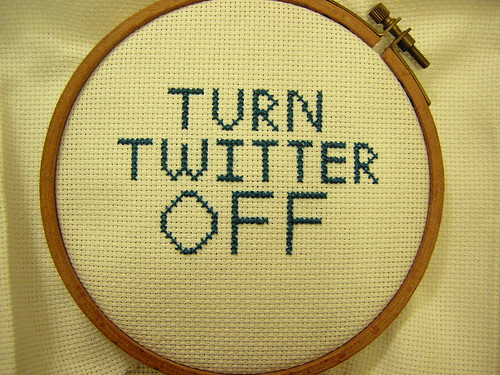
So I thought this week I'd do a bit of cross-stitch. I wanted to do something I could keep by my crafting corner. Something short, something relevant, something that would inspire me and motivate me.

And this is what I came up with:
Turn Twitter Off

Let's see how effective it is :)

Monday, June 28, 2010

Twitter Tips and Strategies

For the past two days I've talking about twitter and mentioned some twitter basics. Today I'm writing about how to find people on twitter, and some strategies if you're using twitter for a business.

How to find people
  1. On the upper part of your twitter screen you'll see a link saying "Find people". If you click on that you'll see a search box. If you type, say, "craft" in that box and press search it will come up with popular people whose username contains craft.
  2. My preferred way to find people though is through the search function. If you go back to your home page you'll see a search box. Type something in there, like, say, craft. It will come up with a list of people who have just tweeted about crafts.
  3. Another good way to find people is to go to someone's twitter page (click their username) and see who is following them, or who they are following.
  4. Each Friday you'll see tons of tweets that start with this: #FF. That stands for Follow Friday. It's basically just shoutouts to people they are following and it's another great way to find new people to follow.

Twitter strategies
I'm just going on the assumption that you're not using twitter for solely fun reasons, but that you're also going to use it to as a marketing and selling tool. If you're doing it for fun, then just start tweeting!
  1. If a large number of followers is something that is important to you there's a few things you might want to do before you follow a bunch of people. First of all, I'd definitely fill in your profile. You can do that by going to settings, then profile. Many people, including me, don't automatically follow back, so the profile is something I look at to determine if I want to follow you. You also add your avatar in the profile section.
  2. I'd also recommend adding a background picture. Go to design, then all the way on the bottom is "change background image". Click "tile background" if you want the pic to repeat, instead of just having one pic filling the screen (you might have to resize it). If you're selling something tangible, this is a good place to show off a product.
  3. Decide what kind of account you will run. There are some businesses that just tweet updates. This might work as a sales tactic for well established and popular sellers, but I for one hardly ever follow people like this. It is however the easiest and less time consuming way, so you should decide if you want to go the easy route, or if you also want to use twitter for networking purposes. I haven't had any sales from twitter, so I can't really speak from experience how to exactly get sales, but I've read that it's much better if you tweet "conversational" things as well as sales type posts.
  4. Do a bunch of tweets first. I also base whether to follow back or not on what someone tweets about. So I'd do maybe 10 or so tweets over a few days before you start following a bunch of people, especially people whose "following" number is much lower than their "followers" number.
  5. What do you tweet about? Anything really. If you want a successful etsy seller to emulate I'd check out CrochetGal's twitter page. You can tweet about something interesting you saw that day, a cool recipe or pattern that you came across, etc. I'd also start talking to people right away, using the @. If I see a twitter page of someone who doesn't have any @ on their page of tweets I often don't follow them. To me that means you're not interested in the social aspect of twitter, and that don't like helping, sharing, or encouraging other people (at least on twitter).
And that's all I can think of. Let me know if I can answer any questions, and say hello to me at http://twitter.com/thatyarnstore

Sunday, June 27, 2010

Twitter Basics

So yesterday I talked about the actual sign up process for twitter. Here's some more of the basics.

How to use twitter
On the right hand side you'll see your username and under that is the number of times you've tweeted. A tweet is anything you've posted. To post a tweet type something in the text box and then click "Tweet". Tweets need to be 140 characters or less.
If you clicked "Follow" to anyone yesterday you'll see everything they've tweeted recently in your home page. If you're not following anyone yet feel free to follow me. Go to my twitter page and click "follow".
How to respond to someone
Hover over their tweet and you'll see "reply" click that. In your tweet text box you'll see @username. The @ is how you respond to people. You don't have to click reply, you at hand type the at symbol and the username instead. When you type the at symbol in the beginning of a tweet only the person you are talking to and people who are following them (or just happen to be looking at your tweets) can see it. If you want everyone to see a tweet which is talking about someone you can write "I love @username", then everyone who is following you can see that tweet. To see if someone has mentioned you click @"yourusername" on the right side of your page.
What is Retweet?
Retweet is when you share a tweet that someone else has written with your followers. You can hover over their tweet and click "retweet", or you can type the following in your text box "RT @username" and then copy and paste whatever they said. Remember to put the RT in front, and not the back because you need something in front of the username so everyone who is following you can see it. Some people put their comments on a RT in front, some people put it after the quote, right after // or some other symbol. To see if someone has retweeted something you wrote click "Retweets" on the right hand side and then "Your tweets retweeted"
Hashtag
You'll start seeing a bunch of tweets that look like this: #knit. This is kind of like putting keywords onto a tweet, it makes it easier for people to find tweets on a certain topic when searching.
To save someone else's tweets
Hover over their tweet and click on the little star above "retweet". You can find it again by clicking favorites
Lists
You can put anyone on a list, even if you aren't following them. Lists can be public, meaning anyone can follow them, or private meaning only you know they are on your list. Lists contain a just a collection of tweets made by the people on the list.


Well, I had no idea I had to say that much about the mechanics of twitter. Tomorrow I'll talk about how to find people, and some newbie strategies for following and being followed.

Saturday, June 26, 2010

How to start a twitter account

I love twitter. I love how it connects communities, and that you can talk with someone who has the exact same view point as you, or an entirely different outlook on life. I love how it's almost a living entity; full of thoughts, feelings, and information from around the world. But enough of what I think...

What is twitter?
Twitter is a social network. Everyone on twitter can post anything they want, as long as it's 140 characters. You can either post updates or musings, or talk with anyone you want (there is a block function though). You can also "follow" people, meaning that once you follow someone everything that is being said by the people you follow shows up on your homepage.

Signing up with twitter is very simple:
1. Go to twitter.com and click "Let me in".
2. Type in all the required fields. Pick a good username. You can change it later on, but it might confuse your followers so it's not very advisable. On twitter someone's username is very visible, and when people talk to you on twitter they refer to your username, so make sure it's one you're comfortable with. Also pick a good password (do not pick the word password as your password! hackers always try these first). When you're done click "Create my account."
3. The next step just suggests popular people you can follow. I would start by adding a few people (like, say, 5) you're interested in, like maybe a news source you'd actually like a source from. You can go back to this later, I'll explain tomorrow.
4. Click "next step: friends."
5. You can skip this and go to "others" if you'd like.
6. Type anything you're interested in, like "crafts" and it will bring up the popular people with that keyword. If you want to know more about a particular person you can click their name (right after the @ symbol) and it will bring them up in a new window. You can go back to this later, I'll explain tomorrow.
7. Go to your email and confirm your twitter account.

And you're done!

Tomorrow I'll talk more in detail about how twitter works, and a few things that you should do before you start wildly following people.